
The EPFO Passbook serves as a digital ledger that captures every financial activity within your Provident Fund account. Managed by the Employees’ Provident Fund Organisation, this online record gives members complete visibility into their retirement savings through a well-organized and easy-to-understand format.
Once you complete your EPFO login with a valid Universal Account Number (UAN), the passbook becomes accessible via the Unified Member Portal. This digital tool empowers salaried individuals to cross-check whether their monthly PF deposits from both personal and employer sides are being credited correctly.
What is EPFO Member Passbook?
The EPFO Member Passbook functions much like a traditional bank passbook but is designed exclusively for your Provident Fund account. It offers a comprehensive breakdown of every PF-related financial entry tied to your UAN.
Key details visible in the passbook include:
- Monthly contribution deducted from the employee’s salary
- Monthly share deposited by the employer
- Allocation toward the Employee Pension Scheme (EPS)
- Yearly interest amount added to the balance
- Cumulative PF savings as of the latest update
This facility operates entirely online and remains accessible around the clock once you complete the authentication process.
How to Access EPFO Passbook Through Login
To review your EPFO passbook, members need to follow the steps outlined below via the Unified Member Portal:
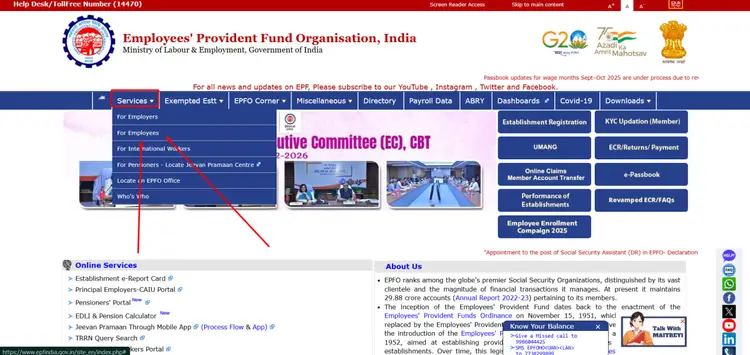
- Head to the official EPFO website at https://www.epfindia.gov.in.
- Look for the “Services” tab meant for employees.
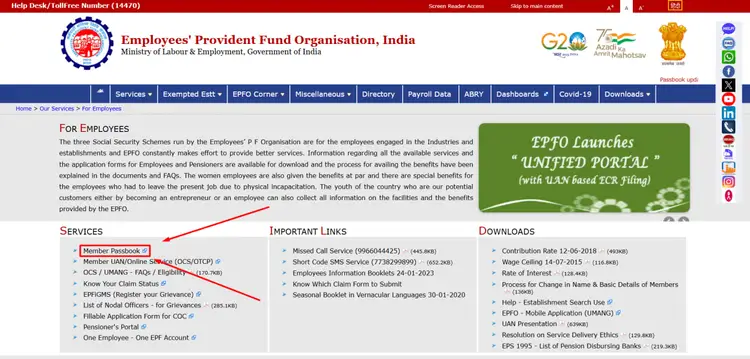
- Click on the “Member Passbook” link from the available options.
- Enter your UAN along with your registered password to log in.
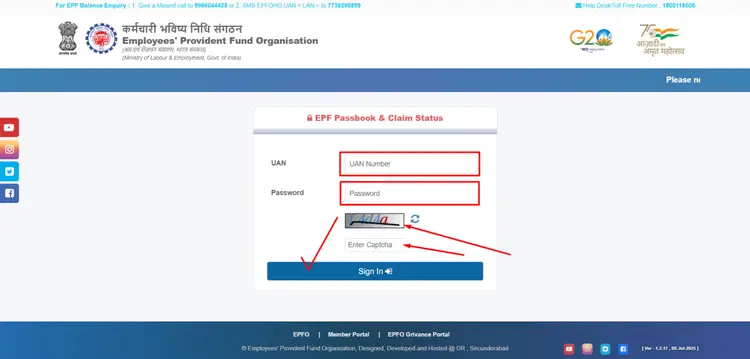
- Authenticate your identity through the OTP delivered to your linked mobile number.
Once verification is complete, the portal will load your full passbook showing contribution records, interest additions, and your overall PF corpus.
EPFO Contribution Breakdown – Percentage-Wise Details
As per the EPF scheme guidelines, both the employee and the employer are required to contribute 12% each, calculated on the employee’s Basic Salary combined with Dearness Allowance (DA). While the employee’s entire share goes into the EPF account, the employer’s portion gets split between two components.
| Contribution Category | Rate (%) | Where It Goes |
|---|---|---|
| Employee’s Share (EPF) | 12% | Entirely credited to the EPF account |
| Employer’s Share – EPF Portion | 3.67% | Deposited into the EPF balance |
| Employer’s Share – EPS Portion | 8.33% | Directed toward the Employee Pension Scheme |
| Combined Monthly Deposit | 24% (12% + 12%) | Total of employee and employer contributions |
The EPS portion (8.33%) applies only up to a salary cap of ₹15,000 per month, restricting the maximum monthly pension contribution to ₹1,250. If the actual salary exceeds this threshold, the surplus from the employer’s side gets redirected into the EPF account.
What Information Does the EPFO Passbook Display?
Your passbook presents a thorough financial summary that covers:
- Contribution credited each month from the employee’s end
- Corresponding employer deposit details
- Pension scheme (EPS) fund allocation
- Interest earned and credited on a yearly basis
- Ongoing total of accumulated PF savings
This systematic layout promotes complete transparency and helps members confirm that their employer is fulfilling deposit obligations without interruption.
How to Download EPFO Passbook in PDF Format
For documentation or personal record-keeping, members can save their passbook digitally:
- Navigate to the passbook section after completing your portal login.
- Locate and click the download button available on the page.
- Store the generated PDF file securely on your phone or computer.
The saved statement proves useful for financial planning, loan applications, tax filing references, or simply maintaining a personal archive of PF transactions.
Why Should You Review Your EPFO Passbook on a Regular Basis?
Making it a habit to examine your EPFO passbook periodically offers several advantages:
- Confirm employer compliance – Ensure deposits are reaching your account every month.
- Observe balance progression – Watch your retirement corpus grow steadily over time.
- Validate interest credits – Check that annual interest is being applied accurately.
- Prepare for withdrawals or claims – Stay informed before initiating any online PF claim.
- Spot discrepancies early – Catch errors or missing entries before they become larger issues.
Staying updated on your Provident Fund activity is a fundamental step toward building financial security and maintaining disciplined retirement planning.
Frequently Asked Questions – EPFO Passbook
What is the process to view my EPFO passbook online?
To access your passbook digitally, visit the Unified Member Portal and sign in using your UAN credentials. Once authenticated, navigate to the “Member Passbook” section where your complete contribution history and current PF balance will be displayed.
Do I need a UAN to open my EPF passbook?
Absolutely. A properly activated UAN is essential for accessing the EPFO passbook. Without valid login details and successful OTP confirmation, the portal will not grant access to your passbook records.
What could cause a delay in my EPFO passbook update?
If recent contributions are missing from your passbook, the likely reason is either a delay in your employer’s deposit submission or additional processing time required by the EPFO system. Typically, entries appear once the monthly contribution cycle is fully processed and reconciled.
Is it possible to save the EPFO passbook on my device?
Yes, the portal provides an option to export your passbook as a PDF document. After logging in successfully, simply use the download feature to save a copy of your complete PF transaction history and balance summary for offline reference.