
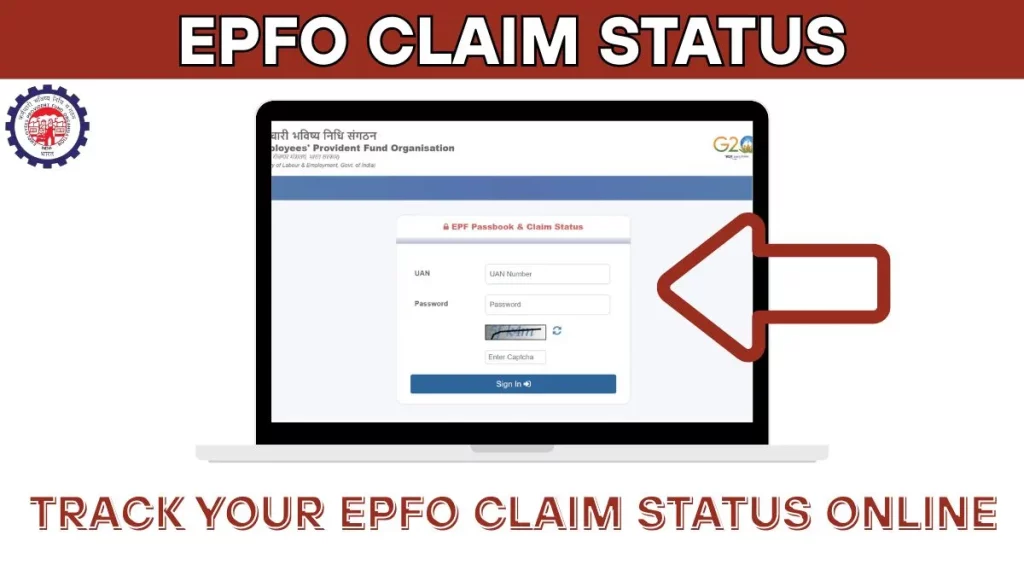
After submitting a PF withdrawal claim, the most common question every member has is — “When will my money arrive?” Waiting without knowing the status can be frustrating, especially when you need funds urgently. The good news is that EPFO allows you to track your claim status online in just a few minutes.
In this section, I’ll show you the exact process to check whether your claim has been settled, rejected, or is still under process. You can also download the complete details in PDF format.
What is EPFO Claim Status?
When you apply for PF withdrawal online, your request goes through multiple stages before the money reaches your bank account. The claim status feature lets you track exactly where your application stands in this process.
| Status | Meaning |
|---|---|
| Under Process | Your claim is received and being reviewed |
| Sent to Field Office | Forwarded to regional EPFO office for processing |
| Under Process at Field Office | Being verified by EPFO officials |
| Claim Settled | Approved and payment processed |
| Rejected | Claim denied due to some issue |
| Payment Sent to Bank | Money transferred to your bank account |
What You Need to Check Claim Status
Before you start, make sure you have these ready:
| Requirement | Details |
|---|---|
| UAN Number | Your 12-digit Universal Account Number |
| Password | Your EPFO member portal password |
| Registered Mobile | To receive OTP for login |
| Internet Connection | Stable connection for smooth access |
Step-by-Step Process to Check EPFO Claim Status
Follow these steps to track your PF withdrawal claim.
Step 1: Open Your Browser
Open any browser on your mobile phone or computer. Chrome browser works best for the EPFO portal. You can use any device — mobile, laptop, or desktop.
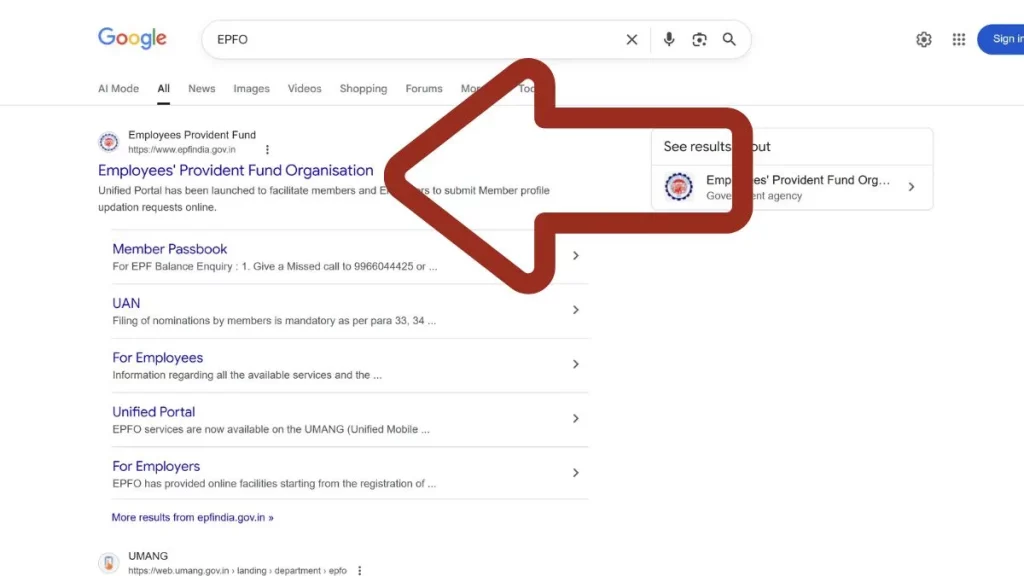
Step 2: Search for EPFO
In the search bar, type “EPFO” and press enter. The first result will show the official EPFO website — Employees’ Provident Fund Organisation of India. Click on this official website link.
Or directly visit: epfindia.gov.in
Step 3: Navigate to Online Claims Section
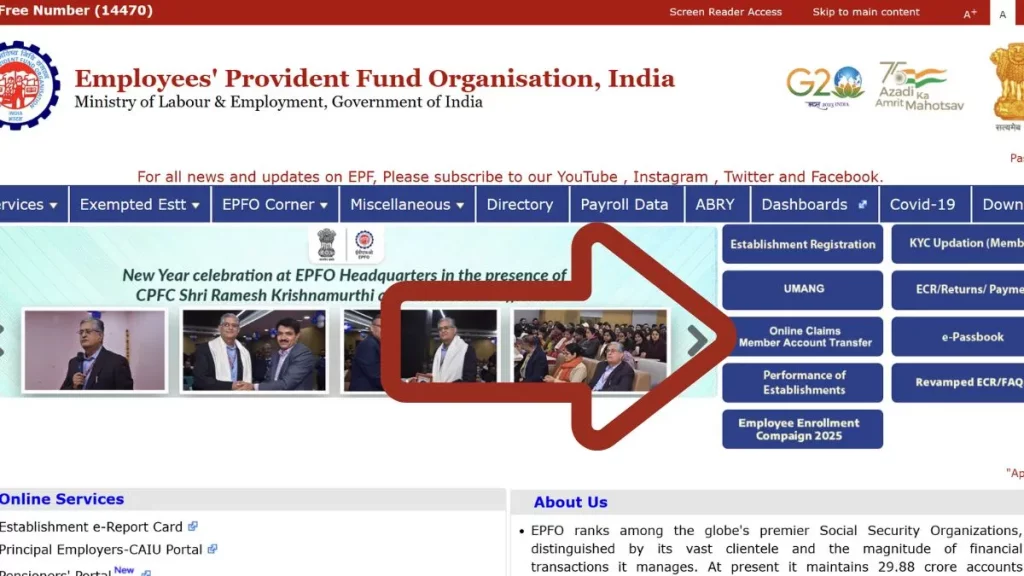
Once the EPFO homepage opens, you’ll see multiple options on the screen. You can check claim status through different sections:
| Option | Path |
|---|---|
| Online Claims | Click on “Online Claims Member Account Transfer” |
| e-Passbook | Check through passbook section |
| KYC Application | View through KYC section |
For claim status, click on “Online Claims Member Account Transfer” option. This will redirect you to the Unified Member Portal.
Step 4: Login to Member Portal
On the Unified Member Portal login page, enter your credentials:
| Field | What to Enter |
|---|---|
| UAN | Your 12-digit Universal Account Number |
| Password | Your member portal password |
| Captcha | Type the characters shown in the image |
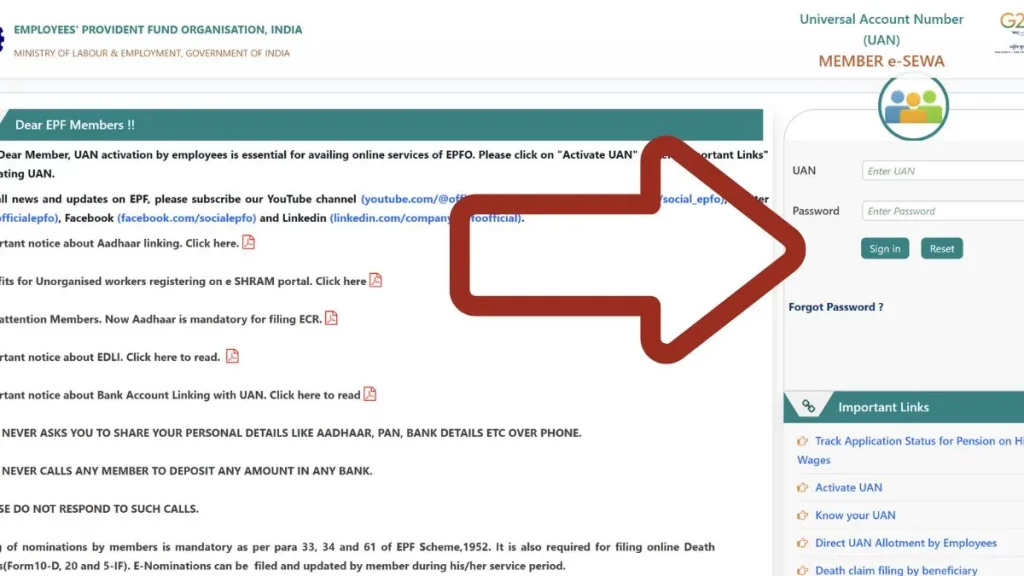
After filling all fields, click on “Sign In” button.
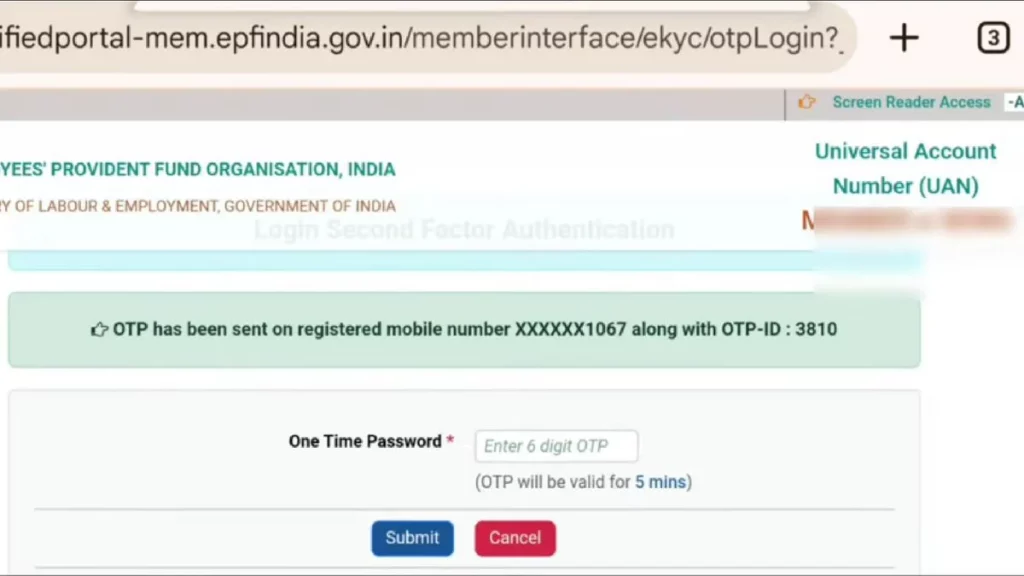
Step 5: Enter OTP
After clicking Sign In, a 6-digit OTP will be sent to your registered mobile number — the number linked with your PF account. Enter this OTP in the given field and click “Submit”.
Your PF account will be logged in successfully.
Step 6: Go to Track Claim Status
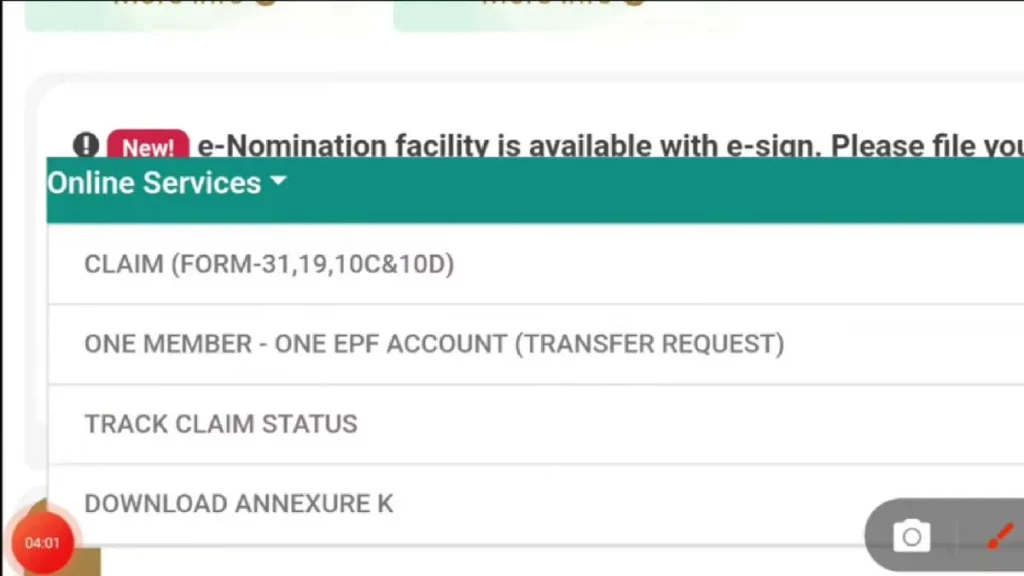
After login, you’ll see your member dashboard. To check claim status:
- Click on the three lines (menu icon) at the corner of your screen
- Look for “Online Services” option
- Click on “Online Services”
- Select “Track Claim Status” from the dropdown
Step 7: View Your Claim Details
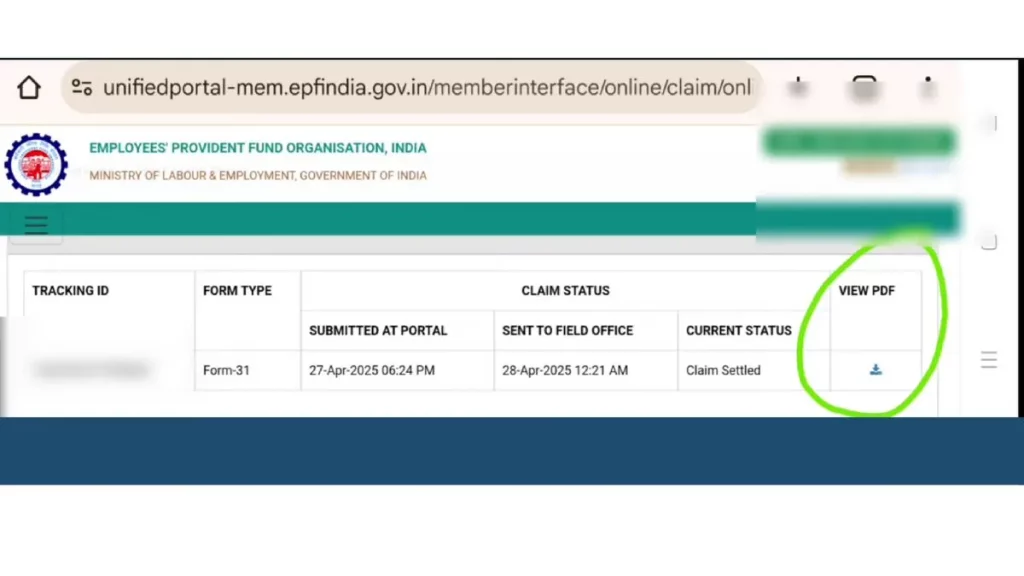
Once you click on Track Claim Status, all your submitted claims will be displayed with complete information:
| Column | Information Shown |
|---|---|
| Tracking ID | Unique ID for your claim |
| Form Type | Form 19, 10C, or 31 used for claim |
| Submitted On | Date when you applied online |
| Sent to Field Office | Date when forwarded to EPFO office |
| Current Status | Settled, Under Process, or Rejected |
| View PDF | Download option for full details |
Step 8: Download Claim Details PDF
For complete information about your claim, click on the download arrow icon in the last column. A PDF file will open showing:
- Your complete claim details
- Amount applied for withdrawal
- Amount settled
- Settlement date
- Bank account where money was sent
- Any deductions made
Understanding Different Claim Status Messages
Here’s what each status message means:
Under Process
Your claim has been received by EPFO system and is in the initial review stage. This usually lasts 1-3 days after submission.
Sent to Field Office
Your claim has been forwarded to the regional EPFO office for verification and approval. This is a positive sign — your claim is moving forward.
Under Process at Field Office
The field office is actively reviewing your claim. They may verify your KYC details, check employer records, or validate other information.
Claim Settled
Great news! Your claim has been approved and the payment has been processed. The money will reach your bank account within 2-3 working days.
Rejected
Your claim was denied. Check the remarks or reason mentioned. Common rejection reasons include:
| Rejection Reason | What to Do |
|---|---|
| KYC mismatch | Correct your KYC details and reapply |
| Bank account error | Update correct bank details |
| Employer verification pending | Contact your employer |
| Incomplete documents | Submit required documents |
| Date of Exit not updated | Ask employer to update DOE |
Payment Sent to Bank
The money has been transferred to your registered bank account. If you haven’t received it yet, wait for 2-3 working days and check your bank statement.
Alternative Methods to Check Claim Status
Besides the member portal, you can check claim status through these methods:
Method 1: UMANG App
- Download UMANG app from Play Store or App Store
- Register with your mobile number
- Search for “EPFO” in the app
- Select “Employee Centric Services”
- Choose “Track Claim Status”
- Enter UAN and verify with OTP
- View your claim status
Method 2: Through Passbook
- Login to EPFO member portal
- Go to View → Passbook
- If claim is settled, it will reflect in passbook as withdrawal entry
- Check the last few entries for settlement details
Method 3: SMS Alert
EPFO sends SMS notifications at each stage of your claim:
| Stage | SMS Content |
|---|---|
| Claim Received | Confirmation of claim submission |
| Sent to Field Office | Claim forwarded for processing |
| Claim Settled | Settlement confirmation with amount |
| Payment Sent | Bank transfer confirmation |
Make sure your mobile number is updated in EPFO records to receive these alerts.
Claim Status Timeline: What to Expect
Based on real experience, here’s the typical timeline for claim processing:
| Stage | Expected Timeline |
|---|---|
| Claim Submitted | Day 1 |
| Under Process | Day 1-3 |
| Sent to Field Office | Day 3-5 |
| Field Office Processing | Day 5-10 |
| Claim Settled | Day 7-15 |
| Money in Bank | Day 10-18 |
Note: This timeline is for claims with complete KYC and no pending issues. Complex cases may take longer.
What to Do If Claim is Stuck
If your claim shows “Under Process” for more than 15-20 days:
Check for Issues
- Login to member portal
- Check if any message or remark is shown
- Verify your KYC status is complete
- Confirm Date of Exit is updated
File a Grievance
If everything looks correct but claim is still pending:
- Visit EPFO Grievance Portal: epfigms.gov.in
- Register your complaint with claim details
- Upload supporting documents if needed
- Note down grievance number for tracking
- EPFO usually responds within 7-10 days
Contact EPFO Helpline
| Contact Method | Details |
|---|---|
| Toll-Free Number | 1800-118-005 |
| Helpdesk | Available on EPFO website |
| Regional Office | Visit with documents for urgent cases |
Common Claim Status Problems and Solutions
Problem: Status Not Updating
| Cause | Solution |
|---|---|
| Server delay | Wait 24-48 hours and check again |
| Employer verification pending | Contact HR to expedite approval |
| Technical glitch | Try checking from different browser |
Problem: Claim Showing Rejected
| Cause | Solution |
|---|---|
| KYC mismatch | Correct KYC and reapply |
| Wrong bank details | Update bank account and reapply |
| Service period issue | Contact EPFO with employment proof |
Problem: Settled But Money Not Received
| Cause | Solution |
|---|---|
| Bank processing time | Wait 2-3 working days |
| Wrong IFSC code | Check bank details in claim PDF |
| Account frozen | Contact your bank |
Claim Status Checklist
Before checking your claim status, verify:
- You have your UAN number
- Password is correct and active
- Mobile number is registered for OTP
- You remember which form you applied with (Form 19, 10C, or 31)
- You know the approximate date of claim submission
Tips for Faster Claim Settlement
To avoid delays in claim processing:
| Do This | Avoid This |
|---|---|
| Complete KYC before applying | Applying with pending KYC |
| Ensure Date of Exit is updated | Ignoring DOE update |
| Use correct bank details | Entering wrong account number |
| Apply during weekdays | Applying on month-end (high traffic) |
| Keep documents ready | Missing required documents |
Tracking your EPFO claim status regularly helps you stay informed and take quick action if any issue arises. Check at least once every 2-3 days after submission until you receive the money in your bank account.